# Videoconferência

Manuais da Videoconferência institucional.

# Utilização da aplicação VideoConf Web

Esse manual destina-se a membros da comunidade IFSP, que pretendem acessar o sistema de Videoconferência via Navegador Web (Notebook ou Desktop). Para dúvidas em relação às credenciais de acesso (Número da Sala e Senha), contate a TI do Campus.

##### **Utilização da aplicação VideoConf Web**

1\. Acesse o site **[videoconf.ifsp.edu.br](https://videoconf.ifsp.edu.br/)**.

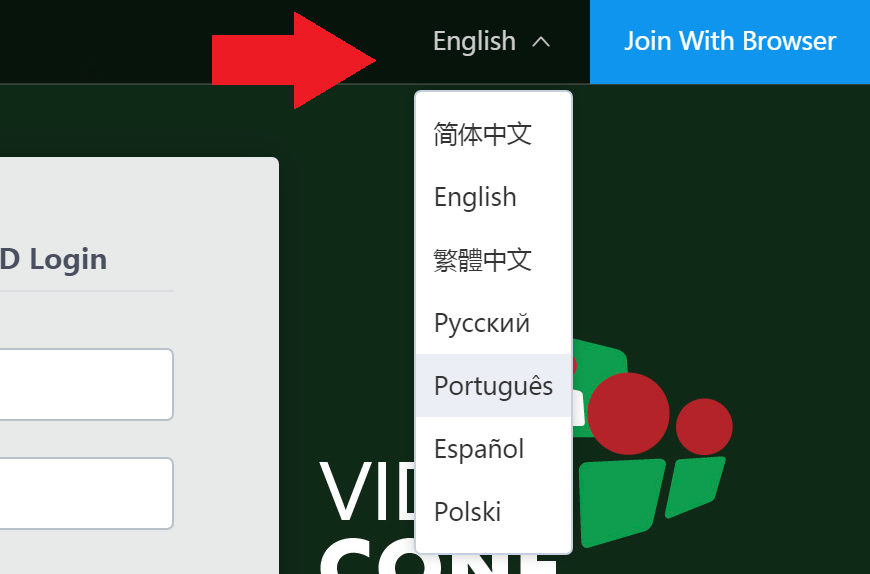
1.1. Altere o Idioma, caso necessário:

[![nEmSem-título.png](https://manuais.ifsp.edu.br/uploads/images/gallery/2019-08/scaled-1680-/nEmSem-t%C3%ADtulo.png)](https://manuais.ifsp.edu.br/uploads/images/gallery/2019-08/nEmSem-t%C3%ADtulo.png)
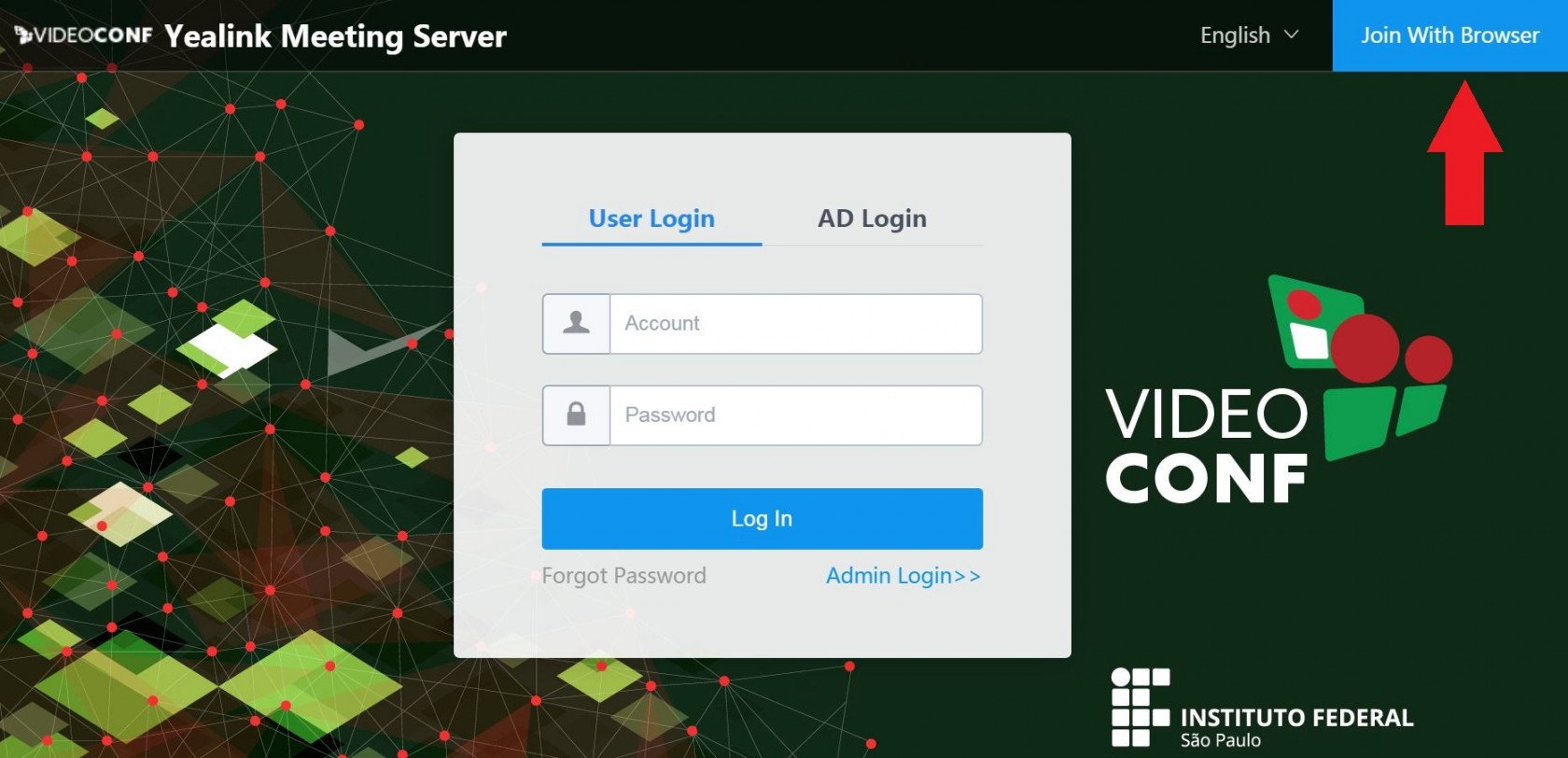
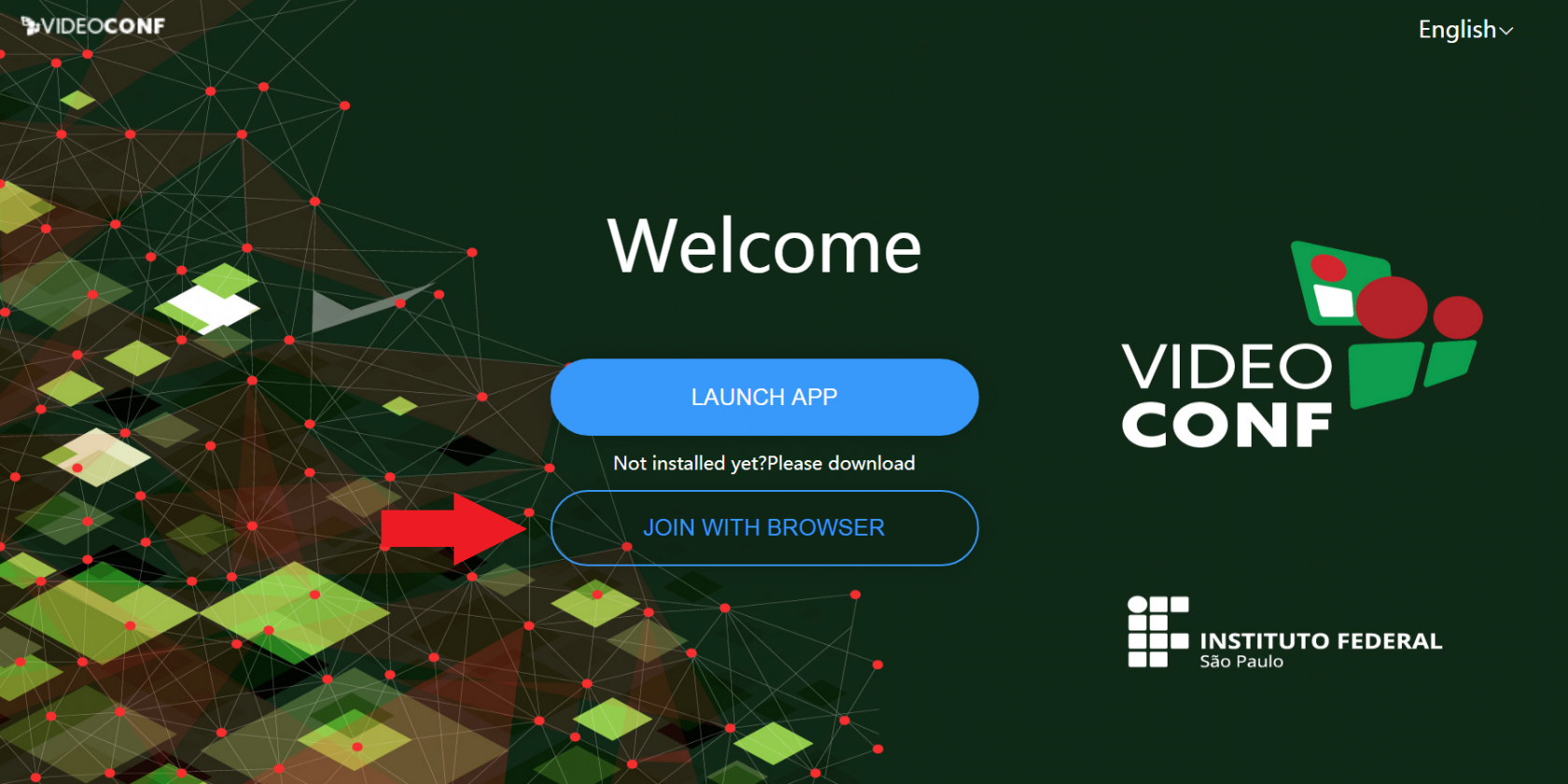
2\. Clique em **'Join With Browser'/'Entrar via Navegador'**.

[![37TCapturar.JPG](https://manuais.ifsp.edu.br/uploads/images/gallery/2019-08/scaled-1680-/37TCapturar.JPG)](https://manuais.ifsp.edu.br/uploads/images/gallery/2019-08/37TCapturar.JPG)
3\. Feito isso, uma nova aba (Web APP) será aberta no Navegador. Clique no botão **'JOIN WITH BROWSER'/'JUNTE-SE COM O NAVEGADOR'**.

[![Sem-título.png](https://manuais.ifsp.edu.br/uploads/images/gallery/2019-08/scaled-1680-/Sem-t%C3%ADtulo.png)](https://manuais.ifsp.edu.br/uploads/images/gallery/2019-08/Sem-t%C3%ADtulo.png)
4\. Digite o **'Número da Sala/Conference ID'**, **'Senha/Conference Password' (se houver)** e **'Seu Nome/Your Name'** e clique no botão **'CONNECT'/'CONECTAR'**.

[![rpTSem-título.png](https://manuais.ifsp.edu.br/uploads/images/gallery/2019-08/scaled-1680-/rpTSem-t%C3%ADtulo.png)](https://manuais.ifsp.edu.br/uploads/images/gallery/2019-08/rpTSem-t%C3%ADtulo.png)
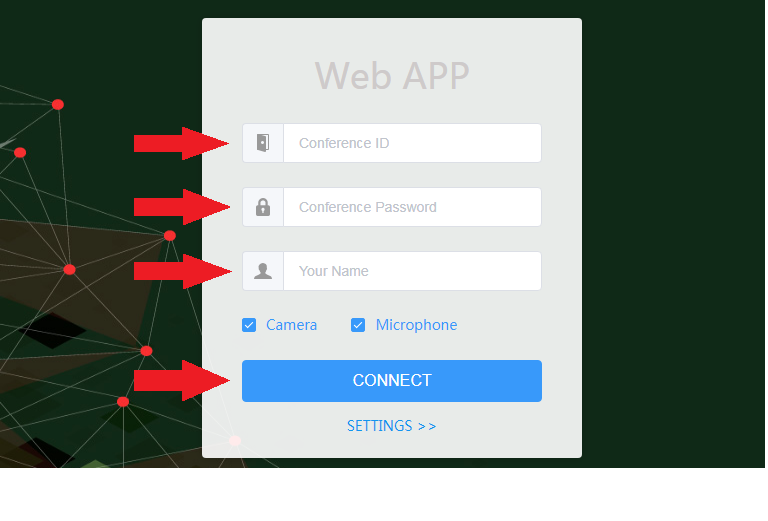
<p class="callout info">**Números das Salas Abertas (não solicitam senha para entrar):** 30001, 30002, 30003, 30004, 30005, 30006, 30007, 30008, 30009 e 30010</p>

<p class="callout info">Para iniciar a videoconferência sem Imagem e Áudio (modo espectador), desmarque as caixas **'Câmera'** e **'Microfone'**.</p>

<p class="callout info">Para configurações de Câmera, Microfone, Saída de áudio, Qualidade de vídeo e Qualidade do conteúdo, acesse o item **'CONFIGURAÇÕES &gt;&gt;'**.</p>

4.1. Clique em **'Permitir'**, para liberar o acesso da aplicação ao Microfone e Câmera.

[![u0USem-título.png](https://manuais.ifsp.edu.br/uploads/images/gallery/2019-08/scaled-1680-/u0USem-t%C3%ADtulo.png)](https://manuais.ifsp.edu.br/uploads/images/gallery/2019-08/u0USem-t%C3%ADtulo.png)
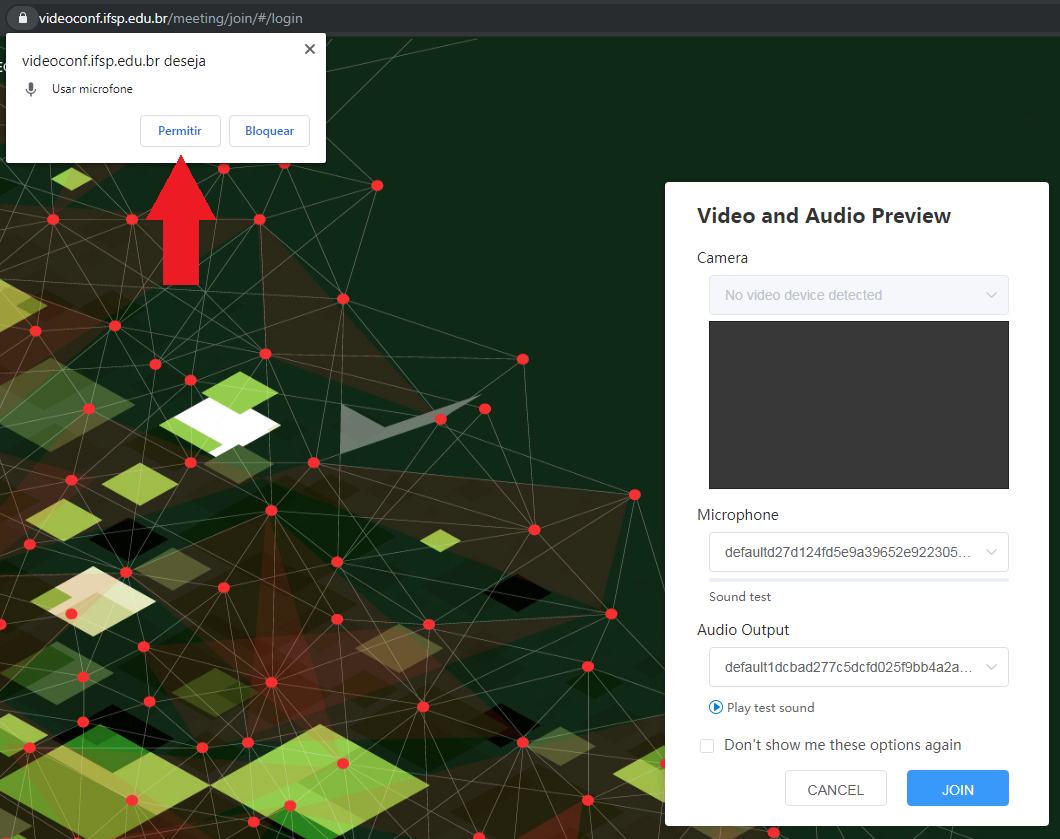
4.2. Verifique se os dispositivos de Câmera, Microfone e Saída de áudio estão de acordo com o desejado; altere caso necessário e clique em **'JOIN'/'Entre'**.

[![PAKSem-título.png](https://manuais.ifsp.edu.br/uploads/images/gallery/2019-08/scaled-1680-/PAKSem-t%C3%ADtulo.png)](https://manuais.ifsp.edu.br/uploads/images/gallery/2019-08/PAKSem-t%C3%ADtulo.png)
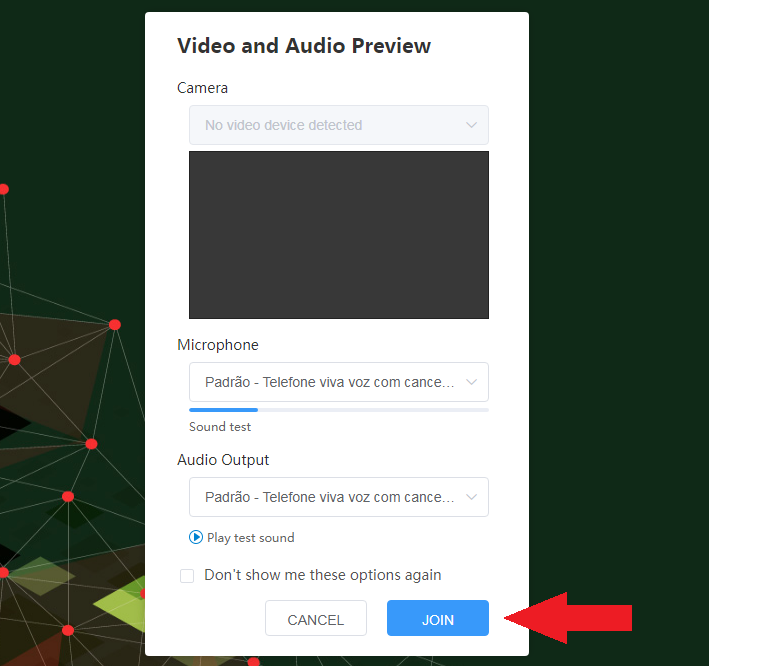
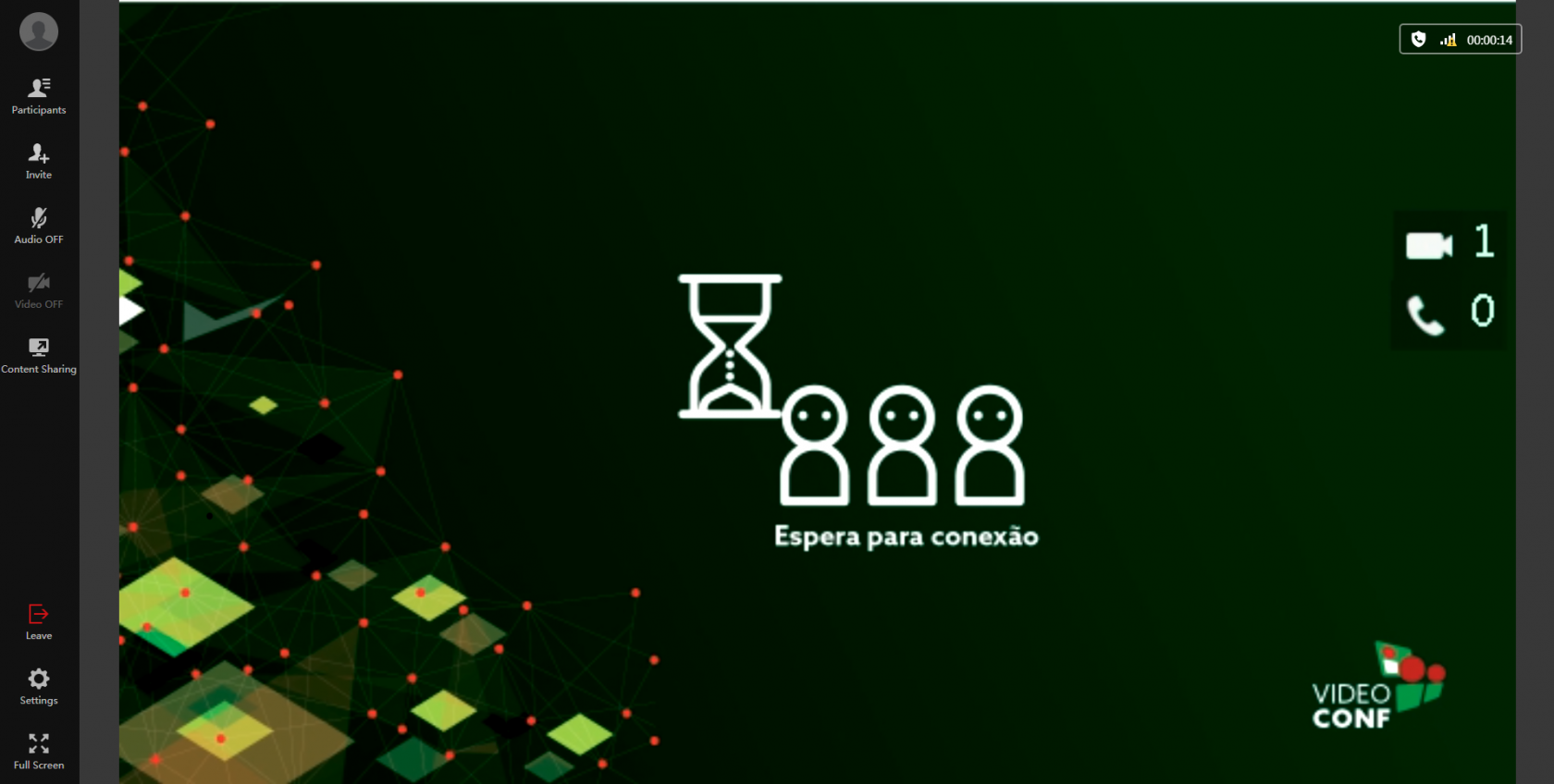
5\. Feito isso, aguarde a entrada na sala.
![image-1565792330486.png](https://manuais.ifsp.edu.br/uploads/images/gallery/2019-08/scaled-1680-/image-1565792330486.png)

# Boas Práticas

Guia de boas práticas para uso geral do serviço de vídeo conferência.

# Recomendações de Uso

O serviço de vídeo conferência do IFSP funcionará dentro dos seguintes parâmetros:

\- O número máximo de conexões simultâneas para todo o serviço até o momento é de 90 conexões, limitada pelo hardware disponível. A Diretoria de Infraestrutura e Redes está atuando constantemente na otimização dos recursos disponíveis para aumentar o número de conexões disponíveis.

\- Utilize para reuniões de organização e coordenação de atividades administrativas, em contraponto a deixar salas abertas com conexões constantes.

\- Reuniões para anúncios e coordenação de atividades devem envolver apenas os responsáveis essenciais ou chefias relacionadas, que ficam responsáveis por disseminar as informações para os demais.

\- Não é recomendado o uso acadêmico deste serviço, como em: aulas, contato direto com alunos que não estejam em comissões ou relacionados a alguma atividade administrativa, gravação de aulas, etc.

\- Para uso acadêmico, poderá ser utilizada a plataforma RNP: [https://conferenciaweb.rnp.br](https://conferenciaweb.rnp.br).

\- Para conversas via chat, a recomendação é a utilização da ferramenta de chat disponível no e-mail institucional.

\- Principais manuais de configuração dos clientes de vídeo conferência:  
[1. Dispositivo de Vídeo Conferência;](https://drive.ifsp.edu.br/s/8c68ada20ec33f6e1fd5bb671bcaef08#pdfviewer)  
[2. Cliente Desktop;](https://drive.ifsp.edu.br/s/8c68ada20ec33f6e1fd5bb671bcaef08#pdfviewer)  
[3. Acesso pelo navegador;](https://manuais.ifsp.edu.br/books/videoconfer%C3%AAncia/page/utiliza%C3%A7%C3%A3o-da-aplica%C3%A7%C3%A3o-videoconf-web)

\- O manual de uso do usuário final fornecido pelo fabricante está disponível neste link (em inglês): [Manual do Usuário](file:///D:/Leonardo/Downloads/Yealink_Meeting_Server_User_Guide_V21.0.0.10.pdf).

\- Foram geradas 3 salas para uso administrativo dos campus. As identificações de acesso de cada sala estão disponíveis neste link: [Salas de Campus](https://manuais.ifsp.edu.br/books/videoconfer%C3%AAncia/page/salas-de-campus).

\- Este documento será editado conforme novas situações sejam necessárias.

# Salas de Campus

<table border="1" id="bkmrk-%C2%A0-v%C3%8Ddeo-confer%C3%8Ancia-" style="border-collapse: collapse; width: 100%;"><tbody><tr><td class="align-center" colspan="5" rowspan="1" style="width: 100%; background-color: #f2f2f2;">**VÍDEO CONFERÊNCIA - SALAS DE CAMPUS**

</td></tr><tr><td style="width: 20%; background-color: #2f9e41;">**Araraquara**

</td><td style="width: 20%; background-color: #2f9e41;">**ID**

</td><td style="width: 20%; background-color: #f2f2f2;"> </td><td style="width: 1.23457%; background-color: #2f9e41;">**Matão**

</td><td style="width: 38.7654%; background-color: #2f9e41;">**ID**

</td></tr><tr><td style="width: 20%;">ARQ - Sala 01

</td><td style="width: 20%;">30021

</td><td style="width: 20%; background-color: #f2f2f2;"> </td><td style="width: 1.23457%;">MTO - Sala 01

</td><td style="width: 38.7654%;">30201

</td></tr><tr><td style="width: 20%;">ARQ - Sala 02

</td><td style="width: 20%;">30022

</td><td style="width: 20%; background-color: #f2f2f2;"> </td><td style="width: 1.23457%;">MTO - Sala 02

</td><td style="width: 38.7654%;">30202

</td></tr><tr><td style="width: 20%;">ARQ - Sala 03

</td><td style="width: 20%;">30023

</td><td style="width: 20%; background-color: #f2f2f2;"> </td><td style="width: 1.23457%;">MTO - Sala 03

</td><td style="width: 38.7654%;">30203

</td></tr><tr><td style="width: 20%; background-color: #2f9e41;">**Avaré**

</td><td style="width: 20%; background-color: #2f9e41;">**ID**

</td><td style="width: 20%; background-color: #f2f2f2;"> </td><td style="width: 1.23457%; background-color: #2f9e41;">**Piracicaba**

</td><td style="width: 38.7654%; background-color: #2f9e41;">**ID**

</td></tr><tr><td style="width: 20%;">AVR - Sala 01

</td><td style="width: 20%;">30031

</td><td style="width: 20%; background-color: #f2f2f2;"> </td><td style="width: 1.23457%;">PRC - Sala 01

</td><td style="width: 38.7654%;">30211

</td></tr><tr><td style="width: 20%;">AVR - Sala 02

</td><td style="width: 20%;">30032

</td><td style="width: 20%; background-color: #f2f2f2;"> </td><td style="width: 1.23457%;">PRC - Sala 02

</td><td style="width: 38.7654%;">30212

</td></tr><tr><td style="width: 20%;">AVR - Sala 03

</td><td style="width: 20%;">30033

</td><td style="width: 20%; background-color: #f2f2f2;"> </td><td style="width: 1.23457%;">PRC - Sala 03

</td><td style="width: 38.7654%;">30213

</td></tr><tr><td style="width: 20%; background-color: #2f9e41;">**Barretos**

</td><td style="width: 20%; background-color: #2f9e41;">**ID**

</td><td style="width: 20%; background-color: #f2f2f2;"> </td><td style="width: 1.23457%; background-color: #2f9e41;">**Pirituba**

</td><td style="width: 38.7654%; background-color: #2f9e41;">**ID**

</td></tr><tr><td style="width: 20%;">BRT - Sala 01

</td><td style="width: 20%;">30041

</td><td style="width: 20%; background-color: #f2f2f2;"> </td><td style="width: 1.23457%;">PTB - Sala 01

</td><td style="width: 38.7654%;">30221

</td></tr><tr><td style="width: 20%;">BRT - Sala 02

</td><td style="width: 20%;">30042

</td><td style="width: 20%; background-color: #f2f2f2;"> </td><td style="width: 1.23457%;">PTB - Sala 02

</td><td style="width: 38.7654%;">30222

</td></tr><tr><td style="width: 20%;">BRT - Sala 03

</td><td style="width: 20%;">30043

</td><td style="width: 20%; background-color: #f2f2f2;"> </td><td style="width: 1.23457%;">PTB - Sala 03

</td><td style="width: 38.7654%;">30223

</td></tr><tr><td style="width: 20%; background-color: #2f9e41;">**Birigui**

</td><td style="width: 20%; background-color: #2f9e41;">**ID**

</td><td style="width: 20%; background-color: #f2f2f2;"> </td><td style="width: 1.23457%; background-color: #2f9e41;">**Presidente Epitácio**

</td><td style="width: 38.7654%; background-color: #2f9e41;">**ID**

</td></tr><tr><td style="width: 20%;">BRI - Sala 01

</td><td style="width: 20%;">30051

</td><td style="width: 20%; background-color: #f2f2f2;"> </td><td style="width: 1.23457%;">PEP - Sala 01

</td><td style="width: 38.7654%;">30231

</td></tr><tr><td style="width: 20%;">BRI - Sala 02

</td><td style="width: 20%;">30052

</td><td style="width: 20%; background-color: #f2f2f2;"> </td><td style="width: 1.23457%;">PEP - Sala 02

</td><td style="width: 38.7654%;">30232

</td></tr><tr><td style="width: 20%;">BRI - Sala 03

</td><td style="width: 20%;">30053

</td><td style="width: 20%; background-color: #f2f2f2;"> </td><td style="width: 1.23457%;">PEP - Sala 03

</td><td style="width: 38.7654%;">30233

</td></tr><tr><td style="width: 20%; background-color: #2f9e41;">**Boituva**

</td><td style="width: 20%; background-color: #2f9e41;">**ID**

</td><td style="width: 20%; background-color: #f2f2f2;"> </td><td style="width: 1.23457%; background-color: #2f9e41;">**Registro**

</td><td style="width: 38.7654%; background-color: #2f9e41;">**ID**

</td></tr><tr><td style="width: 20%;">BTV - Sala 01

</td><td style="width: 20%;">30061

</td><td style="width: 20%; background-color: #f2f2f2;"> </td><td style="width: 1.23457%;">RGT - Sala 01

</td><td style="width: 38.7654%;">30241

</td></tr><tr><td style="width: 20%;">BTV - Sala 02

</td><td style="width: 20%;">30062

</td><td style="width: 20%; background-color: #f2f2f2;"> </td><td style="width: 1.23457%;">RGT - Sala 02

</td><td style="width: 38.7654%;">30242

</td></tr><tr><td style="width: 20%;">BTV - Sala 03

</td><td style="width: 20%;">30063

</td><td style="width: 20%; background-color: #f2f2f2;"> </td><td style="width: 1.23457%;">RGT - Sala 03

</td><td style="width: 38.7654%;">30243

</td></tr><tr><td style="width: 20%; background-color: #2f9e41;">**Bragança Paulista**

</td><td style="width: 20%; background-color: #2f9e41;">**ID**

</td><td style="width: 20%; background-color: #f2f2f2;"> </td><td style="width: 1.23457%; background-color: #2f9e41;">**Salto**

</td><td style="width: 38.7654%; background-color: #2f9e41;">**ID**

</td></tr><tr><td style="width: 20%;">BRA - Sala 01

</td><td style="width: 20%;">30071

</td><td style="width: 20%; background-color: #f2f2f2;"> </td><td style="width: 1.23457%;">SLT - Sala 01

</td><td style="width: 38.7654%;">30251

</td></tr><tr><td style="width: 20%;">BRA - Sala 02

</td><td style="width: 20%;">30072

</td><td style="width: 20%; background-color: #f2f2f2;"> </td><td style="width: 1.23457%;">SLT - Sala 02

</td><td style="width: 38.7654%;">30252

</td></tr><tr><td style="width: 20%;">BRA - Sala 03

</td><td style="width: 20%;">30073

</td><td style="width: 20%; background-color: #f2f2f2;"> </td><td style="width: 1.23457%;">SLT - Sala 03

</td><td style="width: 38.7654%;">30253

</td></tr><tr><td style="width: 20%; background-color: #2f9e41;">**Campinas**

</td><td style="width: 20%; background-color: #2f9e41;">**ID**

</td><td style="width: 20%; background-color: #f2f2f2;"> </td><td style="width: 1.23457%; background-color: #2f9e41;">**São Carlos**

</td><td style="width: 38.7654%; background-color: #2f9e41;">**ID**

</td></tr><tr><td style="width: 20%;">CMP - Sala 01

</td><td style="width: 20%;">30081

</td><td style="width: 20%; background-color: #f2f2f2;"> </td><td style="width: 1.23457%;">SCL - Sala 01

</td><td style="width: 38.7654%;">30261

</td></tr><tr><td style="width: 20%;">CMP - Sala 02

</td><td style="width: 20%;">30082

</td><td style="width: 20%; background-color: #f2f2f2;"> </td><td style="width: 1.23457%;">SCL - Sala 02

</td><td style="width: 38.7654%;">30262

</td></tr><tr><td style="width: 20%;">CMP - Sala 03

</td><td style="width: 20%;">30083

</td><td style="width: 20%; background-color: #f2f2f2;"> </td><td style="width: 1.23457%;">SCL - Sala 03

</td><td style="width: 38.7654%;">30263

</td></tr><tr><td style="width: 20%; background-color: #2f9e41;">**Campos do Jordão**

</td><td style="width: 20%; background-color: #2f9e41;">**ID**

</td><td style="width: 20%; background-color: #f2f2f2;"> </td><td style="width: 1.23457%; background-color: #2f9e41;">**São João da Boa Vista**

</td><td style="width: 38.7654%; background-color: #2f9e41;">**ID**

</td></tr><tr><td style="width: 20%;">CJO - Sala 01

</td><td style="width: 20%;">30091

</td><td style="width: 20%; background-color: #f2f2f2;"> </td><td style="width: 1.23457%;">SBV - Sala 01

</td><td style="width: 38.7654%;">30271

</td></tr><tr><td style="width: 20%;">CJO - Sala 02

</td><td style="width: 20%;">30092

</td><td style="width: 20%; background-color: #f2f2f2;"> </td><td style="width: 1.23457%;">SBV - Sala 02

</td><td style="width: 38.7654%;">30272

</td></tr><tr><td style="width: 20%;">CJO - Sala 03

</td><td style="width: 20%;">30093

</td><td style="width: 20%; background-color: #f2f2f2;"> </td><td style="width: 1.23457%;">SBV - Sala 03

</td><td style="width: 38.7654%;">30273

</td></tr><tr><td style="width: 20%; background-color: #2f9e41;">**Capivari**

</td><td style="width: 20%; background-color: #2f9e41;">**ID**

</td><td style="width: 20%; background-color: #f2f2f2;"> </td><td style="width: 1.23457%; background-color: #2f9e41;">**São José dos Campos**

</td><td style="width: 38.7654%; background-color: #2f9e41;">**ID**

</td></tr><tr><td style="width: 20%;">CPV - Sala 01

</td><td style="width: 20%;">30101

</td><td style="width: 20%; background-color: #f2f2f2;"> </td><td style="width: 1.23457%;">SJC - Sala 01

</td><td style="width: 38.7654%;">30281

</td></tr><tr><td style="width: 20%;">CPV - Sala 02

</td><td style="width: 20%;">30102

</td><td style="width: 20%; background-color: #f2f2f2;"> </td><td style="width: 1.23457%;">SJC - Sala 02

</td><td style="width: 38.7654%;">30282

</td></tr><tr><td style="width: 20%;">CPV - Sala 03

</td><td style="width: 20%;">30103

</td><td style="width: 20%; background-color: #f2f2f2;"> </td><td style="width: 1.23457%;">SJC - Sala 03

</td><td style="width: 38.7654%;">30283

</td></tr><tr><td style="width: 20%; background-color: #2f9e41;">**Caraguatatuba**

</td><td style="width: 20%; background-color: #2f9e41;">**ID**

</td><td style="width: 20%; background-color: #f2f2f2;"> </td><td style="width: 1.23457%; background-color: #2f9e41;">**São Miguel Paulista**

</td><td style="width: 38.7654%; background-color: #2f9e41;">**ID**

</td></tr><tr><td style="width: 20%;">CAR - Sala 01

</td><td style="width: 20%;">30111

</td><td style="width: 20%; background-color: #f2f2f2;"> </td><td style="width: 1.23457%;">SMP - Sala 01

</td><td style="width: 38.7654%;">30291

</td></tr><tr><td style="width: 20%;">CAR - Sala 02

</td><td style="width: 20%;">30112

</td><td style="width: 20%; background-color: #f2f2f2;"> </td><td style="width: 1.23457%;">SMP - Sala 02

</td><td style="width: 38.7654%;">30292

</td></tr><tr><td style="width: 20%;">CAR - Sala 03

</td><td style="width: 20%;">30113

</td><td style="width: 20%; background-color: #f2f2f2;"> </td><td style="width: 1.23457%;">SMP - Sala 03

</td><td style="width: 38.7654%;">30293

</td></tr><tr><td style="width: 20%; background-color: #2f9e41;">**Catanduva**

</td><td style="width: 20%; background-color: #2f9e41;">**ID**

</td><td style="width: 20%; background-color: #f2f2f2;"> </td><td style="width: 1.23457%; background-color: #2f9e41;">**São Paulo**

</td><td style="width: 38.7654%; background-color: #2f9e41;">**ID**

</td></tr><tr><td style="width: 20%;">CTD - Sala 01

</td><td style="width: 20%;">30121

</td><td style="width: 20%; background-color: #f2f2f2;"> </td><td style="width: 1.23457%;">SPO - Sala 01

</td><td style="width: 38.7654%;">30301

</td></tr><tr><td style="width: 20%;">CTD - Sala 02

</td><td style="width: 20%;">30122

</td><td style="width: 20%; background-color: #f2f2f2;"> </td><td style="width: 1.23457%;">SPO - Sala 02

</td><td style="width: 38.7654%;">30302

</td></tr><tr><td style="width: 20%;">CTD - Sala 03

</td><td style="width: 20%;">30123

</td><td style="width: 20%; background-color: #f2f2f2;"> </td><td style="width: 1.23457%;">SPO - Sala 03

</td><td style="width: 38.7654%;">30303

</td></tr><tr><td style="width: 20%; background-color: #2f9e41;">**Cubatão**

</td><td style="width: 20%; background-color: #2f9e41;">**ID**

</td><td style="width: 20%; background-color: #f2f2f2;"> </td><td style="width: 1.23457%;">SPO - Sala 04

</td><td style="width: 38.7654%;">30304

</td></tr><tr><td style="width: 20%;">CBT - Sala 01

</td><td style="width: 20%;">30131

</td><td style="width: 20%; background-color: #f2f2f2;"> </td><td style="width: 1.23457%;">SPO - Sala 05

</td><td style="width: 38.7654%;">30305

</td></tr><tr><td style="width: 20%;">CBT - Sala 02

</td><td style="width: 20%;">30132

</td><td style="width: 20%; background-color: #f2f2f2;"> </td><td style="width: 1.23457%; background-color: #2f9e41;">**São Roque**

</td><td style="width: 38.7654%; background-color: #2f9e41;">**ID**

</td></tr><tr><td style="width: 20%;">CBT - Sala 03

</td><td style="width: 20%;">30133

</td><td style="width: 20%; background-color: #f2f2f2;"> </td><td style="width: 1.23457%;">SRQ - Sala 01

</td><td style="width: 38.7654%;">30311

</td></tr><tr><td style="width: 20%; background-color: #2f9e41;">**Garulhos**

</td><td style="width: 20%; background-color: #2f9e41;">**ID**

</td><td style="width: 20%; background-color: #f2f2f2;"> </td><td style="width: 1.23457%;">SRQ - Sala 02

</td><td style="width: 38.7654%;">30312

</td></tr><tr><td style="width: 20%;">GRU - Sala 01

</td><td style="width: 20%;">30141

</td><td style="width: 20%; background-color: #f2f2f2;"> </td><td style="width: 1.23457%;">SRQ - Sala 03

</td><td style="width: 38.7654%;">30313

</td></tr><tr><td style="width: 20%;">GRU - Sala 02

</td><td style="width: 20%;">30142

</td><td style="width: 20%; background-color: #f2f2f2;"> </td><td style="width: 1.23457%; background-color: #2f9e41;">**Sertãozinho**

</td><td style="width: 38.7654%; background-color: #2f9e41;">**ID**

</td></tr><tr><td style="width: 20%;">GRU - Sala 03

</td><td style="width: 20%;">30143

</td><td style="width: 20%; background-color: #f2f2f2;"> </td><td style="width: 1.23457%;">SRT - Sala 01

</td><td style="width: 38.7654%;">30321

</td></tr><tr><td style="width: 20%; background-color: #2f9e41;">**Hortolândia**

</td><td style="width: 20%; background-color: #2f9e41;">**ID**

</td><td style="width: 20%; background-color: #f2f2f2;"> </td><td style="width: 1.23457%;">SRT - Sala 02

</td><td style="width: 38.7654%;">30322

</td></tr><tr><td style="width: 20%;">HTO - Sala 01

</td><td style="width: 20%;">30151

</td><td style="width: 20%; background-color: #f2f2f2;"> </td><td style="width: 1.23457%;">SRT - Sala 03

</td><td style="width: 38.7654%;">30323

</td></tr><tr><td style="width: 20%;">HTO - Sala 02

</td><td style="width: 20%;">30152

</td><td style="width: 20%; background-color: #f2f2f2;"> </td><td style="width: 1.23457%; background-color: #2f9e41;">**Sorocaba**

</td><td style="width: 38.7654%; background-color: #2f9e41;">**ID**

</td></tr><tr><td style="width: 20%;">HTO - Sala 03

</td><td style="width: 20%;">30153

</td><td style="width: 20%; background-color: #f2f2f2;"> </td><td style="width: 1.23457%;">SOR - Sala 01

</td><td style="width: 38.7654%;">30331

</td></tr><tr><td style="width: 20%; background-color: #2f9e41;">**Itapetininga**

</td><td style="width: 20%; background-color: #2f9e41;">**ID**

</td><td style="width: 20%; background-color: #f2f2f2;"> </td><td style="width: 1.23457%;">SOR - Sala 02

</td><td style="width: 38.7654%;">30332

</td></tr><tr><td style="width: 20%;">ITP - Sala 01

</td><td style="width: 20%;">30161

</td><td style="width: 20%; background-color: #f2f2f2;"> </td><td style="width: 1.23457%;">SOR - Sala 03

</td><td style="width: 38.7654%;">30333

</td></tr><tr><td style="width: 20%;">ITP - Sala 02

</td><td style="width: 20%;">30162

</td><td style="width: 20%; background-color: #f2f2f2;"> </td><td style="width: 1.23457%; background-color: #2f9e41;">**Suzano**

</td><td style="width: 38.7654%; background-color: #2f9e41;">**ID**

</td></tr><tr><td style="width: 20%;">ITP - Sala 03

</td><td style="width: 20%;">30163

</td><td style="width: 20%; background-color: #f2f2f2;"> </td><td style="width: 1.23457%;">SZN - Sala 01

</td><td style="width: 38.7654%;">30341

</td></tr><tr><td style="width: 20%; background-color: #2f9e41;">**Itaquaquecetuba**

</td><td style="width: 20%; background-color: #2f9e41;">**ID**

</td><td style="width: 20%; background-color: #f2f2f2;"> </td><td style="width: 1.23457%;">SZN - Sala 02

</td><td style="width: 38.7654%;">30342

</td></tr><tr><td style="width: 20%;">ITQ - Sala 01

</td><td style="width: 20%;">30171

</td><td style="width: 20%; background-color: #f2f2f2;"> </td><td style="width: 1.23457%;">SZN - Sala 03

</td><td style="width: 38.7654%;">30343

</td></tr><tr><td style="width: 20%;">ITQ - Sala 02

</td><td style="width: 20%;">30172

</td><td style="width: 20%; background-color: #f2f2f2;"> </td><td style="width: 1.23457%; background-color: #2f9e41;">**Tupã**

</td><td style="width: 38.7654%; background-color: #2f9e41;">**ID**

</td></tr><tr><td style="width: 20%;">ITQ - Sala 03

</td><td style="width: 20%;">30173

</td><td style="width: 20%; background-color: #f2f2f2;"> </td><td style="width: 1.23457%;">TUP - Sala 01

</td><td style="width: 38.7654%;">30351

</td></tr><tr><td style="width: 20%; background-color: #2f9e41;">**Jacareí**

</td><td style="width: 20%; background-color: #2f9e41;">**ID**

</td><td style="width: 20%; background-color: #f2f2f2;"> </td><td style="width: 1.23457%;">TUP - Sala 02

</td><td style="width: 38.7654%;">30352

</td></tr><tr><td style="width: 20%;">JCR - Sala 01

</td><td style="width: 20%;">30181

</td><td style="width: 20%; background-color: #f2f2f2;"> </td><td style="width: 1.23457%;">TUP - Sala 03

</td><td style="width: 38.7654%;">30353

</td></tr><tr><td style="width: 20%;">JCR - Sala 02

</td><td style="width: 20%;">30182

</td><td style="width: 20%; background-color: #f2f2f2;"> </td><td style="width: 1.23457%; background-color: #2f9e41;">**Votuporanga**

</td><td style="width: 38.7654%; background-color: #2f9e41;">**ID**

</td></tr><tr><td style="width: 20%;">JCR - Sala 03

</td><td style="width: 20%;">30183

</td><td style="width: 20%; background-color: #f2f2f2;"> </td><td style="width: 1.23457%;">VTP - Sala 01

</td><td style="width: 38.7654%;">30361

</td></tr><tr><td style="width: 20%; background-color: #2f9e41;">**Jundiaí**

</td><td style="width: 20%; background-color: #2f9e41;">**ID**

</td><td style="width: 20%; background-color: #f2f2f2;"> </td><td style="width: 1.23457%;">VTP - Sala 02

</td><td style="width: 38.7654%;">30362

</td></tr><tr><td style="width: 20%;">JND - Sala 01

</td><td style="width: 20%;">30191

</td><td style="width: 20%; background-color: #f2f2f2;"> </td><td style="width: 1.23457%;">VTP - Sala 03

</td><td style="width: 38.7654%;">30363

</td></tr><tr><td style="width: 20%;">JND - Sala 02

</td><td style="width: 20%;">30192

</td><td style="width: 20%; background-color: #f2f2f2;"> </td><td style="width: 1.23457%; background-color: #2f9e41;">**Ilha Solteira**

</td><td style="width: 38.7654%; background-color: #2f9e41;">**ID**

</td></tr><tr><td style="width: 20%;">JND - Sala 03

</td><td style="width: 20%;">30193

</td><td style="width: 20%; background-color: #f2f2f2;"> </td><td style="width: 1.23457%;">IST - Sala 01

</td><td style="width: 38.7654%;">30371

</td></tr><tr><td style="width: 20%;"> </td><td style="width: 20%;"> </td><td style="width: 20%; background-color: #f2f2f2;"> </td><td style="width: 1.23457%;">IST - Sala 02

</td><td style="width: 38.7654%;">30372

</td></tr><tr><td style="width: 20%;"> </td><td style="width: 20%;"> </td><td style="width: 20%; background-color: #f2f2f2;"> </td><td style="width: 1.23457%;">IST - Sala 03

</td><td style="width: 38.7654%;">30373

</td></tr></tbody></table>

# Instalação da aplicação VideoConf - IFSP

Este capítulo descreve a utilização da videoconferência do IFSP

# Download da aplicação VideoConf

Siga as instruções a seguir para efetuar o download da aplicação para desktop (computador pessoal)?

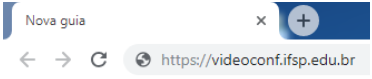
1\) No navegador (browser) de sua preferência acesse o site https://videoconf.ifsp.edu.br[![1.png](https://manuais.ifsp.edu.br/uploads/images/gallery/2020-03/scaled-1680-/1.png)](https://manuais.ifsp.edu.br/uploads/images/gallery/2020-03/1.png)
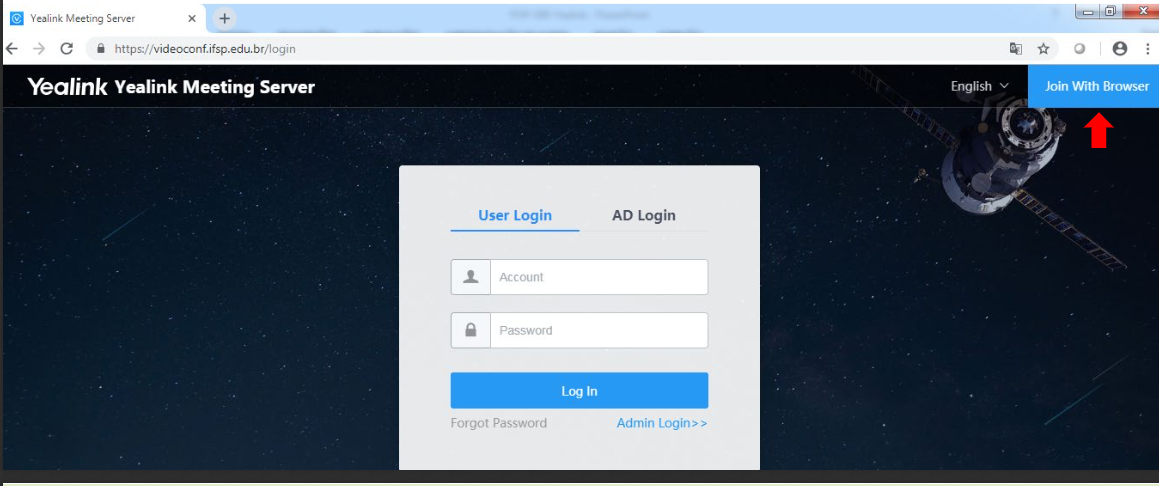
2\) Após isso Clique em "Join With Browser":

[![2.png](https://manuais.ifsp.edu.br/uploads/images/gallery/2020-03/scaled-1680-/2.png)](https://manuais.ifsp.edu.br/uploads/images/gallery/2020-03/2.png)
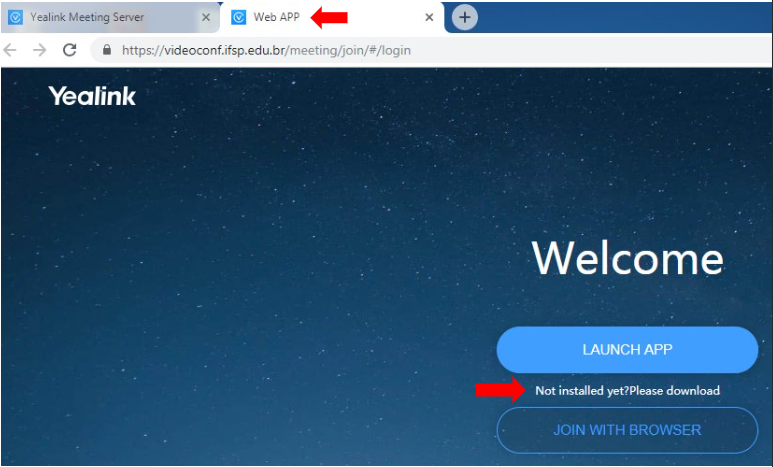
3\) Após esse passo, uma nova aba (ou guia) do navegador se abrirá automaticamente **(Web App)**. Clique em clique em **“Not installed yet?Please download”**

[![oIr2.png](https://manuais.ifsp.edu.br/uploads/images/gallery/2020-03/scaled-1680-/oIr2.png)](https://manuais.ifsp.edu.br/uploads/images/gallery/2020-03/oIr2.png)
4\) Será aberta uma nova aba (guia) em seu navegador, desta vez indicando o caminho para "baixar" o arquivo. Este está localizado dentro do Drive (Nuvem) do próprio IFSP. Clique em **“Yealink VC Desktop 1.28.0.1\_Windows.exe”**

**[![4.png](https://manuais.ifsp.edu.br/uploads/images/gallery/2020-03/scaled-1680-/4.png)](https://manuais.ifsp.edu.br/uploads/images/gallery/2020-03/4.png)**
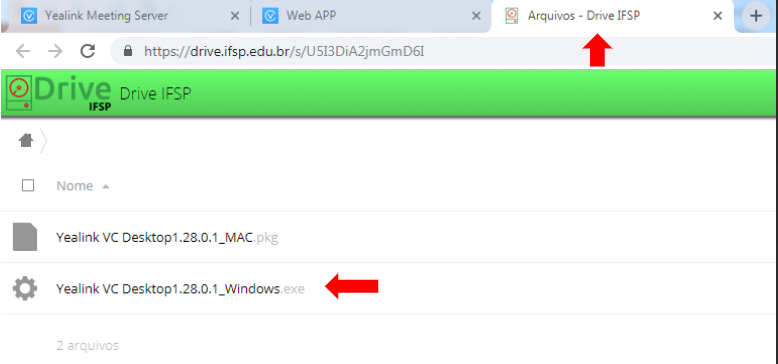
5\) O progresso do download será apresentado no "rodapé" de seu navegador.

[![w8h5.png](https://manuais.ifsp.edu.br/uploads/images/gallery/2020-03/scaled-1680-/w8h5.png)](https://manuais.ifsp.edu.br/uploads/images/gallery/2020-03/w8h5.png)
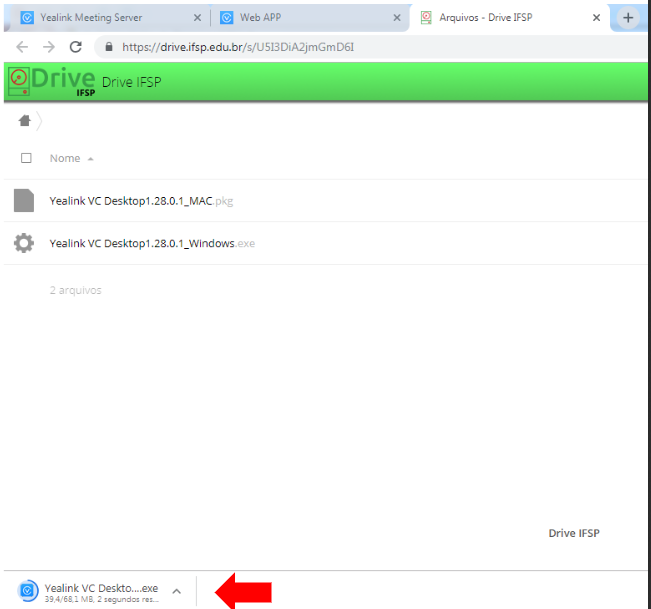
Após realizar essa sequencia de passos, será necessário realizar a instalação da aplicação. [Clique nesta página](https://manuais.ifsp.edu.br/books/videoconfer%C3%AAncia/page/instala%C3%A7%C3%A3o-do-programa-videoconf) para seguir as instruções.

# Instalação do Programa VideoConf

Após ter realizado o download do programa, siga as instruções a seguir:

1\) Ao abrir a tela **(Abrir Arquivo -Aviso de Segurança)** clique em **“Executar”**

[![6.jpg](https://manuais.ifsp.edu.br/uploads/images/gallery/2020-03/scaled-1680-/6.jpg)](https://manuais.ifsp.edu.br/uploads/images/gallery/2020-03/6.jpg)
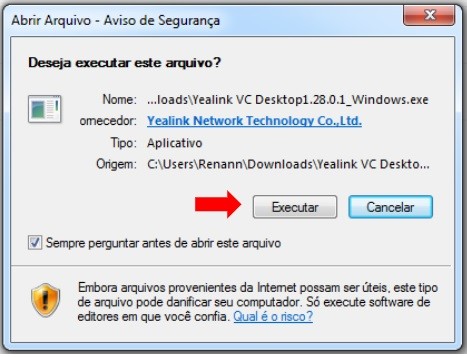
2\) Ao clicar em Executar no passo anterior aguarde o processo **“Data Extraction...”**

<table id="bkmrk-%C2%A0-%C2%A0" style="height: 112px; width: 97.1605%; border-collapse: collapse; border-style: hidden;"><tbody><tr><td style="width: 9.54198%;"> </td><td style="width: 29.3893%;">[![7.jpg](https://manuais.ifsp.edu.br/uploads/images/gallery/2020-03/scaled-1680-/7.jpg)](https://manuais.ifsp.edu.br/uploads/images/gallery/2020-03/7.jpg)</td><td style="width: 61.0687%;"> </td></tr></tbody></table>

3\) Após a extração dos dados clique em  **“One-click Setup”**

**[![8.jpg](https://manuais.ifsp.edu.br/uploads/images/gallery/2020-03/scaled-1680-/8.jpg)](https://manuais.ifsp.edu.br/uploads/images/gallery/2020-03/8.jpg)**
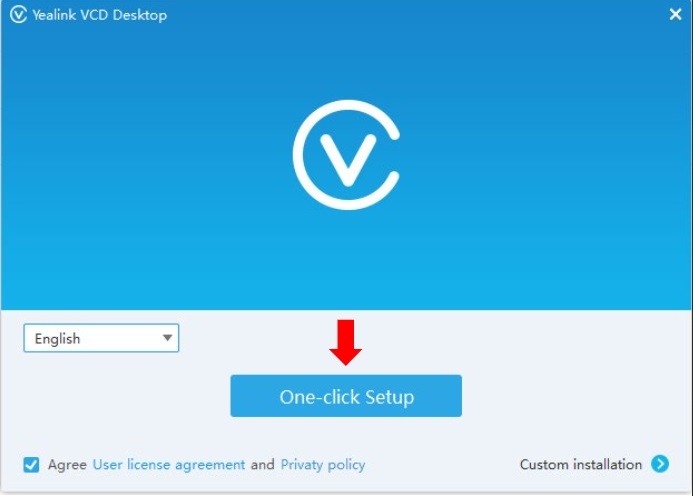
4)Clique em **“Begin to experience”** para iniciar a aplicaçãoNa área de trabalho será criado o ícone da aplicação.

[![05e6.png](https://manuais.ifsp.edu.br/uploads/images/gallery/2020-03/scaled-1680-/05e6.png)](https://manuais.ifsp.edu.br/uploads/images/gallery/2020-03/05e6.png)
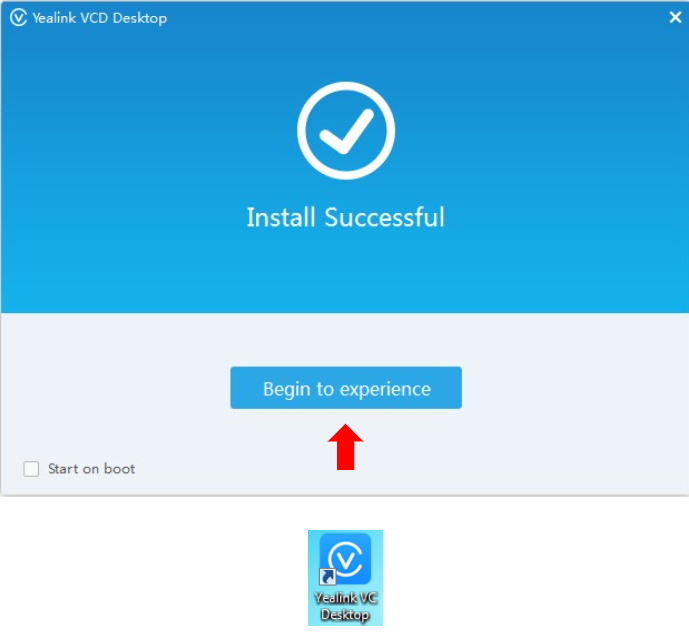
Após finalizar esses passos, a videoconferência está pronta para ser utilizada. [Clique nesta página](https://manuais.ifsp.edu.br/books/videoconfer%C3%AAncia/page/utiliza%C3%A7%C3%A3o-da-videoconf) para conhecer os detalhes de utilização.

# Utilização da VideoConf

Nesta altura, você já deverá ter realizado o download e instalado o programa para utlização da videoconferência. Os passos a seguir mostram como acessar e utilizar a aplicação.

1\) A aplicação da **Yealink** (programa da videoconferência) irá abrir conforme tela ao lado. Repare que o ícone da aplicação aparecerá na barra ao lado do relógio.

[![Uj97.jpg](https://manuais.ifsp.edu.br/uploads/images/gallery/2020-03/scaled-1680-/Uj97.jpg)](https://manuais.ifsp.edu.br/uploads/images/gallery/2020-03/Uj97.jpg)
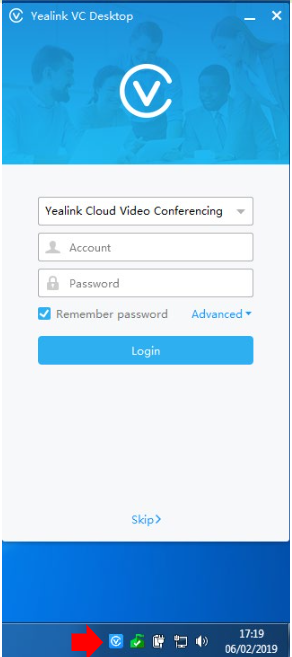
2\) Clique em **“Yealink Cloud Video Conferencing”** e selecione **“Yealink Meeting Server”**

[![1Pb8.jpg](https://manuais.ifsp.edu.br/uploads/images/gallery/2020-03/scaled-1680-/1Pb8.jpg)](https://manuais.ifsp.edu.br/uploads/images/gallery/2020-03/1Pb8.jpg)
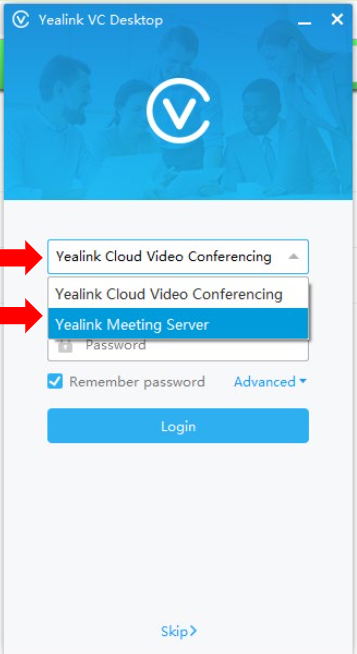
3\) Preencha os campos conforme os dados:

- Account(Número SIAPE)
- Password(Senha do SUAP)
- Server (videoconf.ifsp.edu.br)
- Clique em “Remember password” desmarcando o tique azul para o login não acontecer automaticamente e então clique em “Login”

[![kf68.jpg](https://manuais.ifsp.edu.br/uploads/images/gallery/2020-03/scaled-1680-/kf68.jpg)](https://manuais.ifsp.edu.br/uploads/images/gallery/2020-03/kf68.jpg)
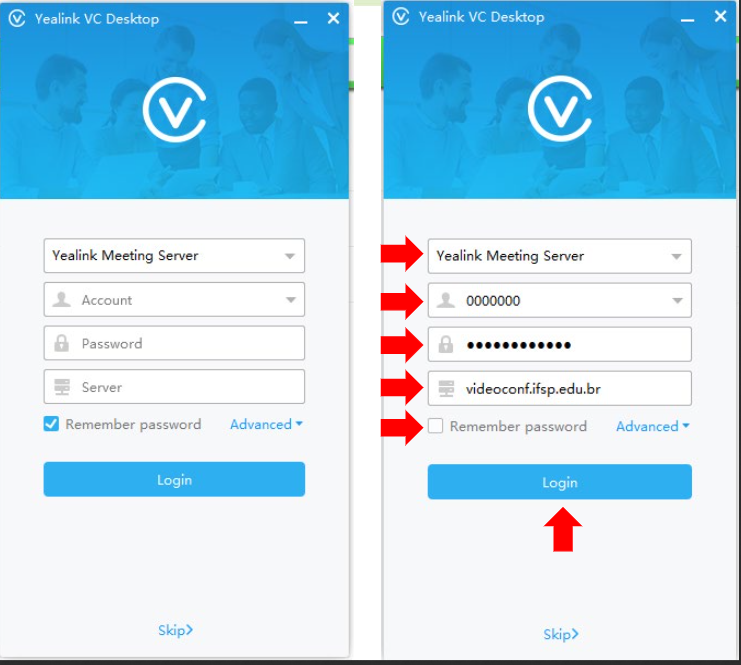
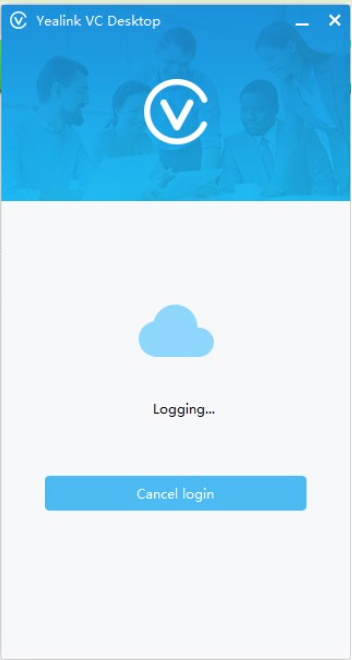
4\) Aguarde até que a autenticação (login) seja realizada

[![MB88.jpg](https://manuais.ifsp.edu.br/uploads/images/gallery/2020-03/scaled-1680-/MB88.jpg)  ](https://manuais.ifsp.edu.br/uploads/images/gallery/2020-03/MB88.jpg)
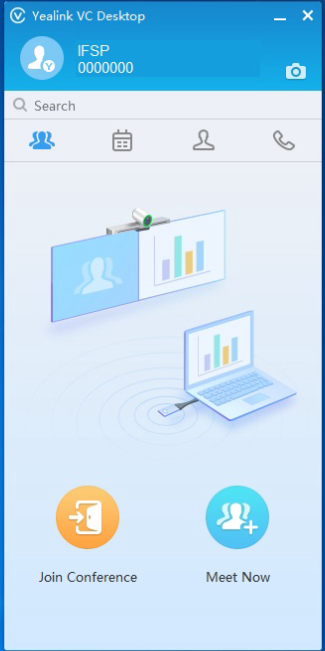
A tela inicial do programa (aplicativo) é a seguinte:

[![lVB7.jpg](https://manuais.ifsp.edu.br/uploads/images/gallery/2020-03/scaled-1680-/lVB7.jpg)](https://manuais.ifsp.edu.br/uploads/images/gallery/2020-03/lVB7.jpg)
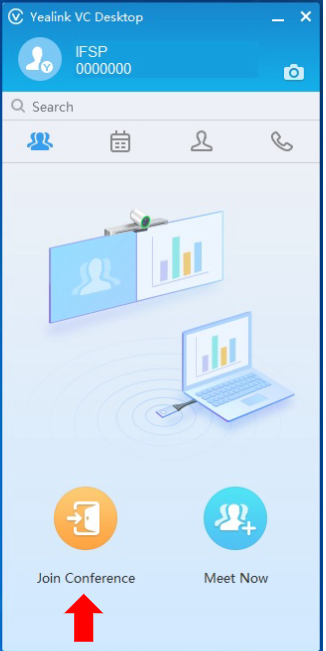
5\) Para se juntar a uma sala em que esteja acontecendo uma reunião, clique em "Join Conference".

[![ntl7.jpg](https://manuais.ifsp.edu.br/uploads/images/gallery/2020-03/scaled-1680-/ntl7.jpg)](https://manuais.ifsp.edu.br/uploads/images/gallery/2020-03/ntl7.jpg)
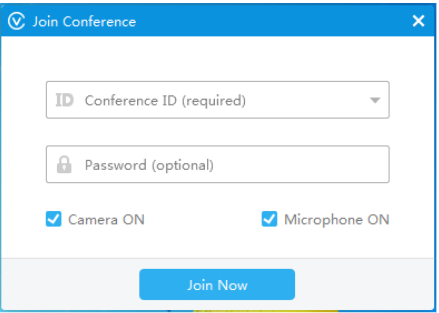
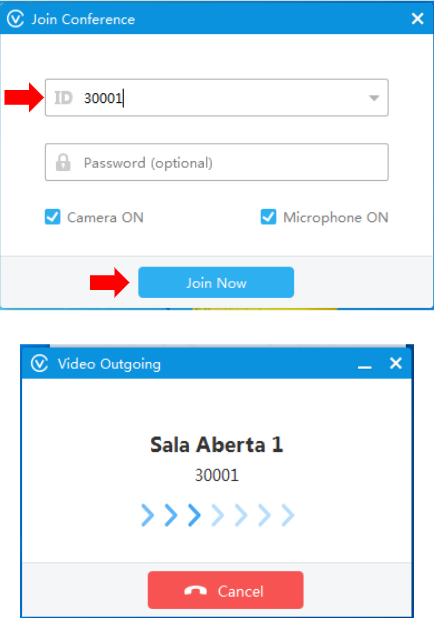
6\) Em **"Conference ID (required)”** podem ser colocadas as salas abertas da Yealink (que não possuem senha, não sendo necessário preencher o campo **“Password(optional)”)**

Estas salas são identificadas pela numeração a seguir:30001, 30002, 30003, 30004, 30005, 30006, 30007, 30008, 30009 e 30010;

[![DME7.jpg](https://manuais.ifsp.edu.br/uploads/images/gallery/2020-03/scaled-1680-/DME7.jpg)](https://manuais.ifsp.edu.br/uploads/images/gallery/2020-03/DME7.jpg)
Um exemplo de ingresso na sala pode ser visto a seguir, com a utilização da sala 30001; ao clicar em **"JoinNow”**aparecerá a tela **“Video Outgoing”**

**[![Bk67.jpg](https://manuais.ifsp.edu.br/uploads/images/gallery/2020-03/scaled-1680-/Bk67.jpg)](https://manuais.ifsp.edu.br/uploads/images/gallery/2020-03/Bk67.jpg)**
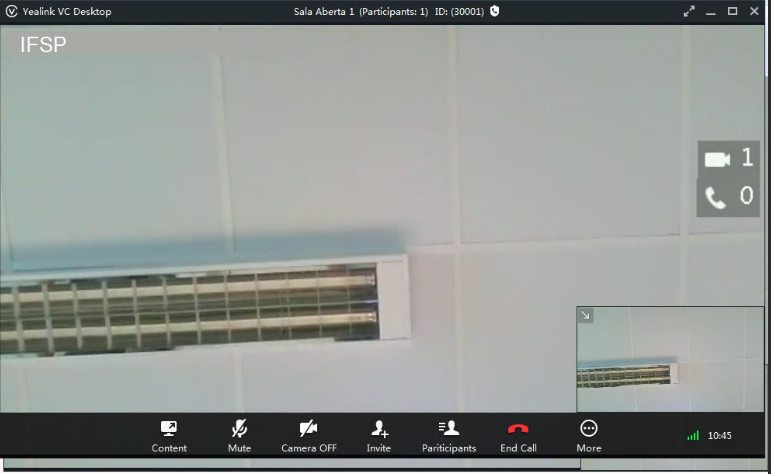
Pronto, a sala 30001 já está pronta para ser utilizada:

[![gws7.jpg](https://manuais.ifsp.edu.br/uploads/images/gallery/2020-03/scaled-1680-/gws7.jpg)](https://manuais.ifsp.edu.br/uploads/images/gallery/2020-03/gws7.jpg)
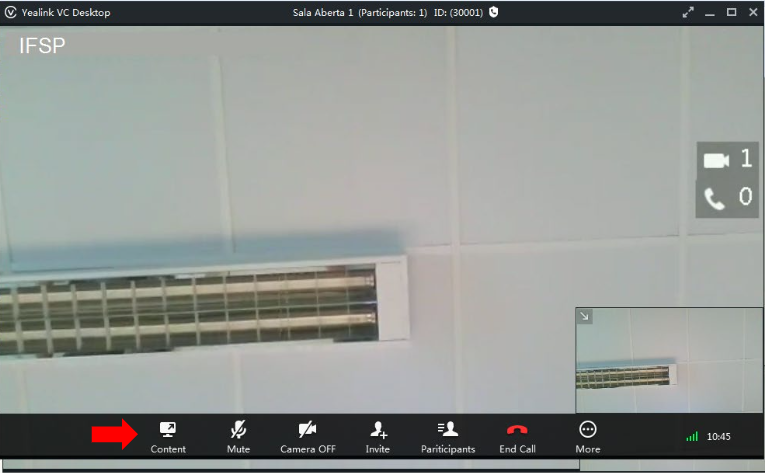
7\) Para realizar o compartilhamento de tela clique em **“Content”**

**[![9TL7.jpg](https://manuais.ifsp.edu.br/uploads/images/gallery/2020-03/scaled-1680-/9TL7.jpg)](https://manuais.ifsp.edu.br/uploads/images/gallery/2020-03/9TL7.jpg)**
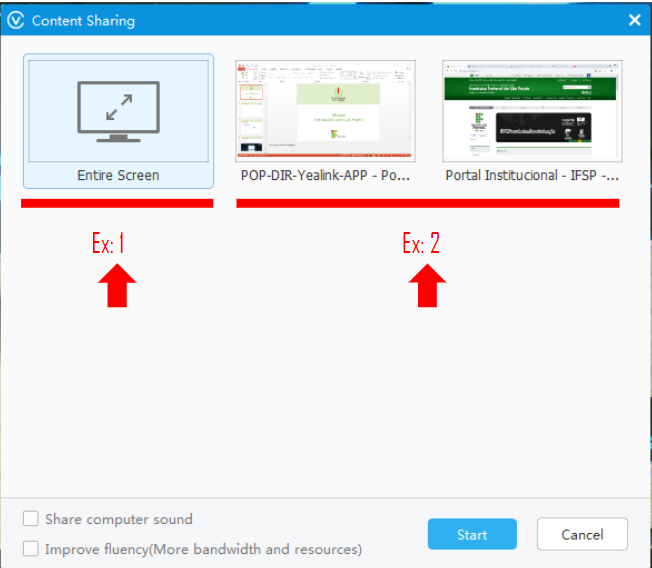
Na imagem abaixo temos 2 exemplos pra compartilhamento de tela.

- A opção “EntireScreen (Ex:1)compartilha todas as telas abertas em seu dispositivo que forem movimentadas durante a apresentação;
- As outras “duas telas (Ex:2)são aplicações abertas, se selecionadas apenas será mostrada a tela dessa aplicação, não mostrando as outras telas abertas.

[![RON6.png](https://manuais.ifsp.edu.br/uploads/images/gallery/2020-03/scaled-1680-/RON6.png)](https://manuais.ifsp.edu.br/uploads/images/gallery/2020-03/RON6.png)
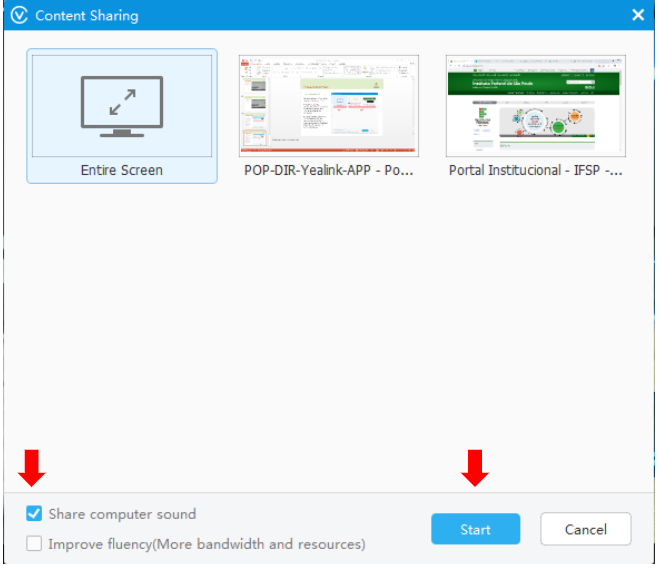
8\) Caso queria compartilhar o som interno do dispositivo para os interlocutores que terão acesso a sua tela compartilhada clique em **“Share computer sound”.**

Fica a critério de quem for compartilhar a tela selecionar ou não essa opção. Pra iniciar o compartilhamento clique em **“Start”**

**[![Vw46.png](https://manuais.ifsp.edu.br/uploads/images/gallery/2020-03/scaled-1680-/Vw46.png)](https://manuais.ifsp.edu.br/uploads/images/gallery/2020-03/Vw46.png)**
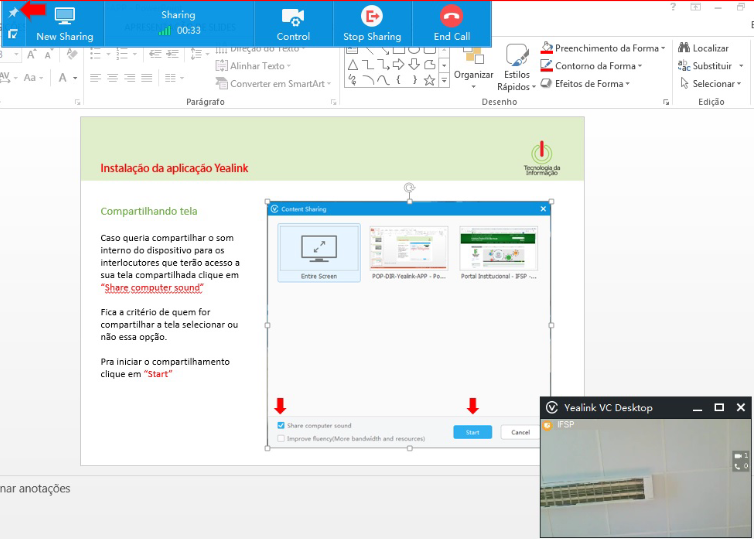
Repare que a tela está sendo compartilhada.Pra fixar a barra de tarefas em azul clique no ícone que representa uma **“agulha” ou "percevejo".**

**[![U5Z6.png](https://manuais.ifsp.edu.br/uploads/images/gallery/2020-03/scaled-1680-/U5Z6.png)](https://manuais.ifsp.edu.br/uploads/images/gallery/2020-03/U5Z6.png)**
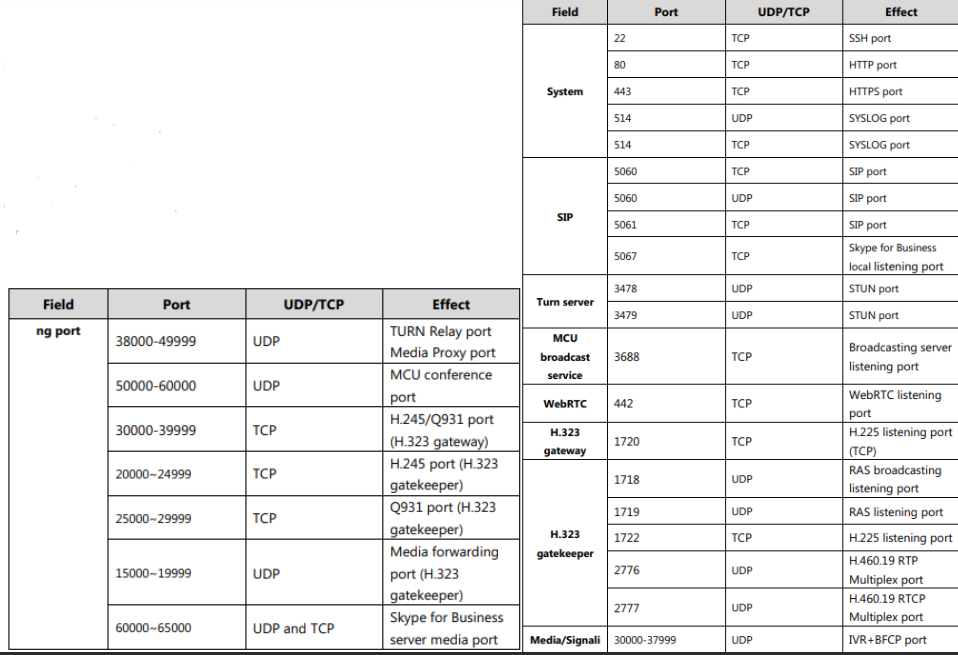
# Portas do Firewall utilizadas na VideoConf

Essas portas precisam estar liberadas no firewall com destino os IPs: 45.236.121.15 e 45.236.121.16.

[![firewall.png](https://manuais.ifsp.edu.br/uploads/images/gallery/2020-03/scaled-1680-/firewall.png)](https://manuais.ifsp.edu.br/uploads/images/gallery/2020-03/firewall.png)