# [Passo.05] Visualizar Resultado

<p class="callout info"><span style="font-size: 18.5pt; font-family: Roboto,sans-serif; color: #222222; background-color: transparent; font-weight: 400; font-style: normal; font-variant: normal; text-decoration: none; vertical-align: baseline; white-space: pre-wrap;"><span style="font-size: 10.5pt; font-family: Roboto,sans-serif; color: #01466c; background-color: transparent; font-weight: 400; font-style: normal; font-variant: normal; text-decoration: none; vertical-align: baseline; white-space: pre-wrap;">Quem acessa? Aluno</span></span></p>

<p class="callout warning">Permite ao aluno acompanhar o resultado das análises preliminar e final da inscrição.  
Os resultados são apresentados baseados na etapa em que o processo de seleção se encontra, por isso é apresentado somente o resultado mais recente, ou seja, para cada inscrição do aluno haverá apenas uma linha.  
A etapa é identificada de acordo com as datas definidas em Cadastro dos Períodos de Inscrição.</p>

<span style="font-size: 18.5pt; font-family: Roboto,sans-serif; color: #222222; background-color: transparent; font-weight: 400; font-style: normal; font-variant: normal; text-decoration: none; vertical-align: baseline; white-space: pre-wrap;"><span style="font-size: 13.999999999999998pt; font-family: Roboto,sans-serif; color: #222222; background-color: transparent; font-weight: 400; font-style: normal; font-variant: normal; text-decoration: none; vertical-align: baseline; white-space: pre-wrap;">1. Acessar a página de resultado  
</span></span><span style="font-size: 10.5pt; font-family: Roboto,sans-serif; color: #444444; background-color: transparent; font-weight: 400; font-style: normal; font-variant: normal; text-decoration: none; vertical-align: baseline; white-space: pre-wrap;">No menu, abra: ATIVIDADES ESTUDANTIS &gt;&gt; Serviço Social &gt;&gt; Programas &gt;&gt; </span><span style="font-size: 10.5pt; font-family: Roboto,sans-serif; color: #444444; background-color: transparent; font-weight: bold; font-style: normal; font-variant: normal; text-decoration: none; vertical-align: baseline; white-space: pre-wrap;">Visualizar Resultado</span>

<span style="font-size: 13.999999999999998pt; font-family: Roboto,sans-serif; color: #222222; background-color: transparent; font-weight: 400; font-style: normal; font-variant: normal; text-decoration: none; vertical-align: baseline; white-space: pre-wrap;">2. Interpretar o resultado</span>

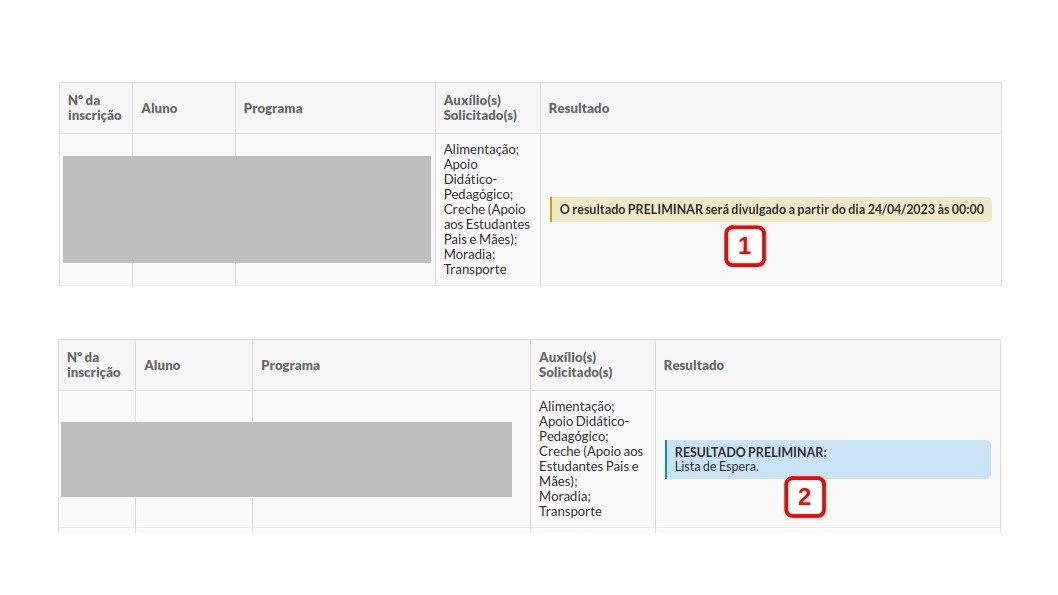
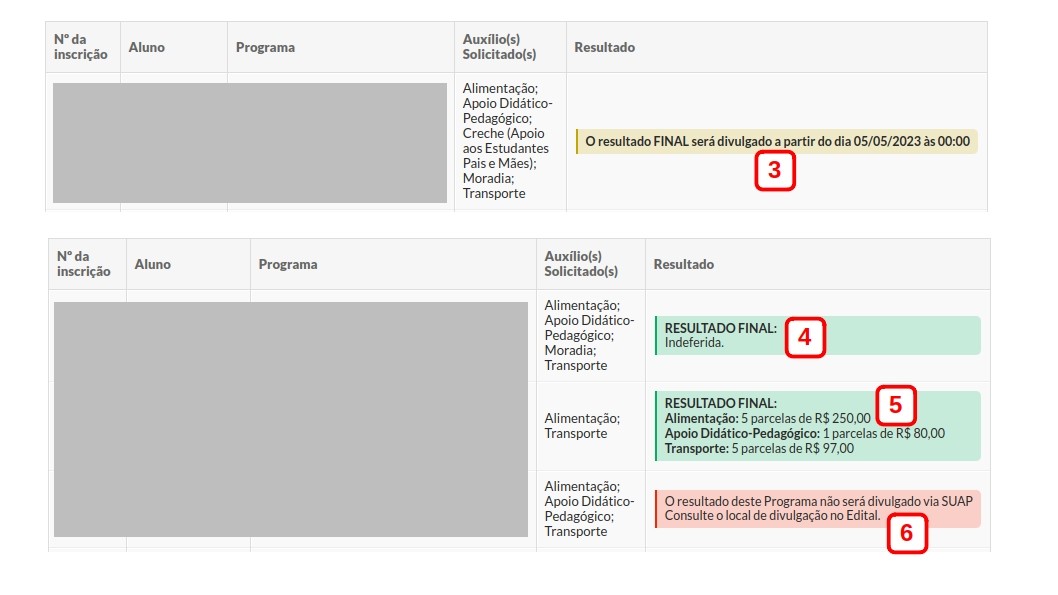
<span style="font-size: 10.5pt; font-family: Roboto,sans-serif; color: #444444; background-color: transparent; font-weight: 400; font-style: normal; font-variant: normal; text-decoration: none; vertical-align: baseline; white-space: pre-wrap;">Nas imagens seguintes são exibidas 6 inscrições, com diferentes resultados:</span>

<span style="font-size: 10.5pt; font-family: Roboto,sans-serif; color: #444444; background-color: transparent; font-weight: bold; font-style: normal; font-variant: normal; text-decoration: none; vertical-align: baseline; white-space: pre-wrap;">Imagem 1.</span><span style="font-size: 10.5pt; font-family: Roboto,sans-serif; color: #444444; background-color: transparent; font-weight: 400; font-style: normal; font-variant: normal; text-decoration: none; vertical-align: baseline; white-space: pre-wrap;"> situação exibida enquanto não atingir a data de divulgação do resultado preliminar;</span>

<span style="font-size: 10.5pt; font-family: Roboto,sans-serif; color: #444444; background-color: transparent; font-weight: bold; font-style: normal; font-variant: normal; text-decoration: none; vertical-align: baseline; white-space: pre-wrap;">Imagem 2. <span style="font-size: 10.5pt; font-family: Roboto,sans-serif; color: #444444; background-color: transparent; font-weight: 400; font-style: normal; font-variant: normal; text-decoration: none; vertical-align: baseline; white-space: pre-wrap;">situação exibida a partir da data de divulgação do resultado preliminar e enquanto o período de recurso ainda não tiver sido encerrado. Neste caso, até o momento o aluno não foi contemplado (não há registro de contemplação), por isso é exibida a mensagem “Lista de Espera”;</span></span>

<span style="font-size: 10.5pt; font-family: Roboto,sans-serif; color: #444444; background-color: transparent; font-weight: bold; font-style: normal; font-variant: normal; text-decoration: none; vertical-align: baseline; white-space: pre-wrap;">Imagem 3.</span><span style="font-size: 10.5pt; font-family: Roboto,sans-serif; color: #444444; background-color: transparent; font-weight: 400; font-style: normal; font-variant: normal; text-decoration: none; vertical-align: baseline; white-space: pre-wrap;"> situação exibida após o período de recurso e enquanto não atingir a data de divulgação do resultado final;</span>

<span style="font-size: 10.5pt; font-family: Roboto,sans-serif; color: #444444; background-color: transparent; font-weight: bold; font-style: normal; font-variant: normal; text-decoration: none; vertical-align: baseline; white-space: pre-wrap;">Imagem 4.</span><span style="font-size: 10.5pt; font-family: Roboto,sans-serif; color: #444444; background-color: transparent; font-weight: 400; font-style: normal; font-variant: normal; text-decoration: none; vertical-align: baseline; white-space: pre-wrap;"> situação exibida quando o resultado final já foi divulgado e o aluno teve sua inscrição indeferida;</span>

<span style="font-size: 10.5pt; font-family: Roboto,sans-serif; color: #444444; background-color: transparent; font-weight: bold; font-style: normal; font-variant: normal; text-decoration: none; vertical-align: baseline; white-space: pre-wrap;">Imagem 5. <span style="font-size: 10.5pt; font-family: Roboto,sans-serif; color: #444444; background-color: transparent; font-weight: 400; font-style: normal; font-variant: normal; text-decoration: none; vertical-align: baseline; white-space: pre-wrap;">situação exibida quando o resultado final já foi divulgado e o aluno teve sua inscrição contemplada</span></span><span style="font-size: 10.5pt; font-family: Roboto,sans-serif; color: #444444; background-color: transparent; font-weight: 400; font-style: normal; font-variant: normal; text-decoration: none; vertical-align: baseline; white-space: pre-wrap;">. Neste caso, são exibidos os benefícios, número de parcelas e valor de cada parcela;</span>

<span style="font-size: 10.5pt; font-family: Roboto,sans-serif; color: #444444; background-color: transparent; font-weight: bold; font-style: normal; font-variant: normal; text-decoration: none; vertical-align: baseline; white-space: pre-wrap;">Imagem 6.</span><span style="font-size: 10.5pt; font-family: Roboto,sans-serif; color: #444444; background-color: transparent; font-weight: 400; font-style: normal; font-variant: normal; text-decoration: none; vertical-align: baseline; white-space: pre-wrap;"> essa situação é exibida quando a data de divulgação do resultado final não estiver configurada em </span>[<span style="font-size: 10.5pt; font-family: Roboto,sans-serif; color: #1155cc; background-color: transparent; font-weight: 400; font-style: normal; font-variant: normal; text-decoration: none; vertical-align: baseline; white-space: pre-wrap;">Configurar Período</span>](https://manuais.ifsp.edu.br/books/atividades-estudantis/page/configurar-per%C3%ADodo)<span style="font-size: 10.5pt; font-family: Roboto,sans-serif; color: #444444; background-color: transparent; font-weight: 400; font-style: normal; font-variant: normal; text-decoration: none; vertical-align: baseline; white-space: pre-wrap;"> </span><span style="font-size: 10.5pt; font-family: Roboto,sans-serif; color: #444444; background-color: transparent; font-weight: 400; font-style: normal; font-variant: normal; text-decoration: none; vertical-align: baseline; white-space: pre-wrap;">[![resultado-ae-01.jpg](https://manuais.ifsp.edu.br/uploads/images/gallery/2023-04/scaled-1680-/resultado-ae-01.jpg)](https://manuais.ifsp.edu.br/uploads/images/gallery/2023-04/resultado-ae-01.jpg)[![resultado-ae-02.jpg](https://manuais.ifsp.edu.br/uploads/images/gallery/2023-04/scaled-1680-/resultado-ae-02.jpg)](https://manuais.ifsp.edu.br/uploads/images/gallery/2023-04/resultado-ae-02.jpg)</span>